







GLOBE-Res
-
Posts
103 -
Joined
-
Last visited
Content Type
Profiles
Forums
Gallery
Posts posted by GLOBE-Res
-
-
Well it bugs me because it's not consistent.
The lines show up on some foundation walls but not all foundation walls. When the lines appear on some walls but not all walls it's confusing.
And, I don't build foundation walls with a specific brick ledge. I simply but brick at the top of the wall.
-
This is crazy. 8 foundation walls are clean. One foundation wall shows a brick ledge. WTH.
Someone needs to be able to answer this problem.
-
 1
1
-
-
I understand that it's likely a brick ledge line but I don't want to see the line. Other foundation walls have a brick ledge but they don't have the brick ledge line. WTF!!!!!!!!!!!!!!!!!!!!
-
how do I turn off brick ledge line?
-
LOL ok, that narrows it down lol. Nope, it's a foundation wall, no pony wall.
-
FOR SOME REASON SIMILAR WALLS HAVE AN ADDITIONAL LINE. WHY? WHAT IS THE ADDITIONAL LINE?
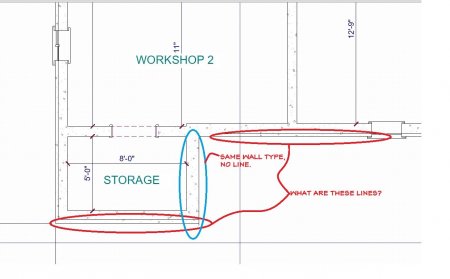
-
-
-
-
-
-
So how do I set the SELECT ROOM in 3D?
-
Woo Hoo, it worked!
Thanks Eric.
Would it be possible to use ZOOM to look at the file real time?
-
Ahh, I wondered. Thank you.
-
Not sure how to set SELECT ROOM in 3d View.
-
Alianiello Existing.planOk, so, I'm trying to upload my file. Let me know if it is coming through.
-
If you look at the attached photos the walls are "things" that you can shape by picking the tags - see top right and top left. But, in the two lower photos the entire wall is "grouped" and you can't change the shape.
Ok folks, is it just me or am I the only one thinking that this would all be so much easier if we could use ZOOM to talk about these problems we are having.
So, in the picture on the left the Stone has blended up on to the wall above the roof. where as the picture on the right the Siding has blended correctly above the roof.
How do I correct the model on the left?

-
Thank you for that explanation. But, I didn't change anything from project to project. I have been using a file that was created about a year ago that was probably one of the most complex projects I have completed. I simply go in and delete the project then start over in the same file. It has worked for a number of projects. That's why I was confused when this issue was encountered. Great lesson learned though.
-
What about changing to the Technical Illustration view?

-
Five minutes ago I was able to manipulate a wall shape. Now I can't. Why not?
Parts of walls can be manipulated and other parts can't be manipulated. What am I missing here?

-
The Home Designer plan doesn't want to attach saying it's bigger than 14M.
But, you can see from the jpeg the floor system between level 1 and foundation level is not being "built".
In other projects that floor system is being built. So I don't understand what is being done differently.
-
Hmm, I thought I included my file. I'll check again.

-
Ok, I have no idea what is happening with the project. I've compared it to other projects and can't figure out why my ceiling and floor are not "filling in".
Any thoughts are welcome.
-
I don't always remember to switch my license from desk top computer to lap top computer and it's a constant hassle.
Is there a way for the software to know that if it is starting on one computer not to start on any other computer without a manual reset?
With technology, I shouldn't have to manually turn off the license on my desktop given it isn't running on the desk top computer and then need to load the license on my lap top.
Or am I not doing something right? Does it automatically unload when it isn't running and then automatically load on which ever computer that starts it up?


WALLS WITH LINES. WHAT IS THE ADDITIONAL LINE?
in Q&A
Posted
I do however Thank you for your effort to answer my question. Greatly appreciated.
I love the software. Much, much easier to use than Revit and does about the same job.